

How to Protect Formula Cells in Google Sheets
If a team shares a lead tracker, one pasted row can overwrite the formula that flags overdue follow-ups. Protect the
Practical articles about freelancing, online work, digital skills and responsible ways to build experience.
If a team shares a lead tracker, one pasted row can overwrite the formula that flags overdue follow-ups. Protect the

A customer ID like 00128 can become 128 when Excel interprets a CSV column as numbers. That matters if your

When an export puts the company, city, and account ID into one cell, sorting by city becomes a manual job.

A shared lead tracker can turn a ten-minute follow-up routine into a hunt through hundreds of rows. Google Sheets filter

Build a five-company B2B lead research sample, qualify prospects against a brief and quote a paid pilot with a practical proposal example.

Use a simple Google Sheets audit to catch incomplete rows and document exceptions before a client handoff.

Add consistent lead status dropdowns in Google Sheets and test them with a simple outreach workflow.

Explore data entry in 2026 through current freelance rate benchmarks, an invoice-checking example and a practice project for your first proposal.
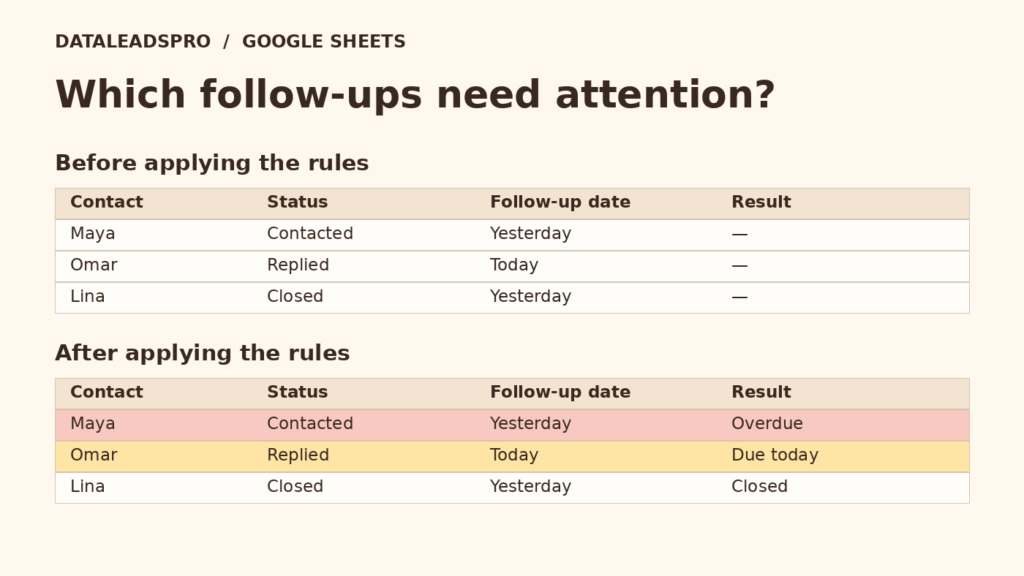
Use two conditional formatting rules to highlight overdue follow-ups in red and today’s calls in amber while skipping blank dates and closed leads.
Build a Google Sheets lead tracker with a status dropdown, a follow-up reminder formula and a worked example you can test in a blank spreadsheet.